JConsole Booster
A maintained, modern JConsole fork for JVM ops engineers who rely on JMX in production.
Download for macOS (Apple Silicon) Download for Windows (x64) Download for Linux (x86_64)
Version 1.1.0 on all three platforms · code-signed on macOS and Windows · Java runtime bundled.
What you get
JConsole Booster is an OpenJDK 25 fork of the standard JConsole, modernised for people who actually live in JMX. It keeps everything JConsole does — Overview, Memory, Threads, Classes, VM Summary, MBeans — and adds the things that make production JMX work bearable: rich operation forms, connection bookmarks, remembered parameter values, and a clean cross-platform look.
The headline feature is a markup system that turns plain MBeanInfo descriptions into real form widgets — dropdowns, date pickers, file pickers, multi-line text areas. It is fully opt-in: servers that don’t add markup behave exactly as they would under vanilla JConsole, and every other JMX client (JConsole, VisualVM, Mission Control) still shows the description as plain text. Nothing to break, nothing to lock into.
- Markup-driven operation forms. Embed
,, or `` in a parameter description and the right widget renders automatically. - MIME-aware
byte[]returns. Tag an operation `` and the result opens in your PDF viewer instead of scrolling past as a hex blob. - Per-parameter value persistence. Last-used values are remembered per operation and pre-filled next time — stop retyping the same payload forty times a session.
- Connection bookmarks. A hand-editable, syncable text file drives a bookmarks menu with grouping and colour, using the same
host:portshorthand you type on the command line. - JMXMP transport. A single TCP port, tunnel-friendly over SSH — no RMI dynamic-port surprises through firewalls.
- Modern Nimbus UI with one-line colour theming. Pass
-c=#5B9BD5on launch to set the accent colour.
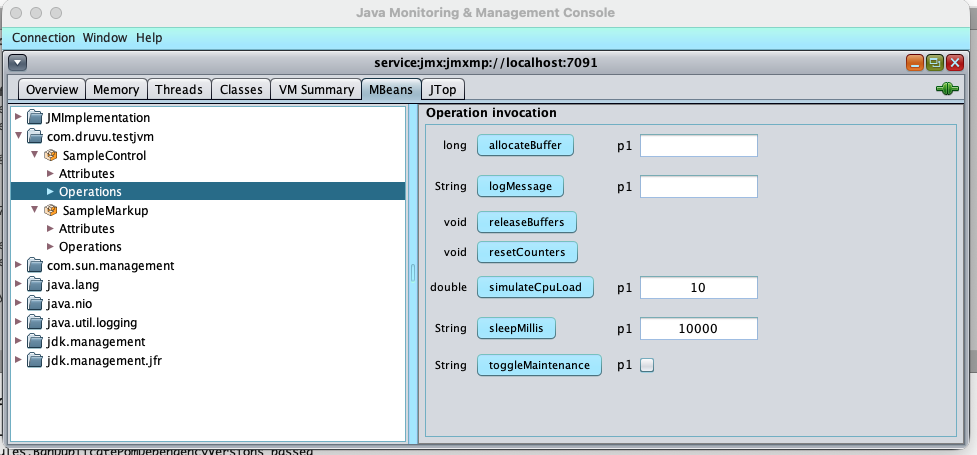
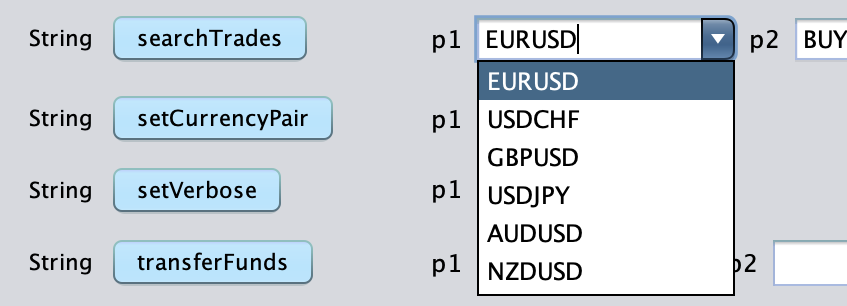
Operations render as typed widgets — here a currency-pair dropdown generated from a `` description, instead of a bare text field.
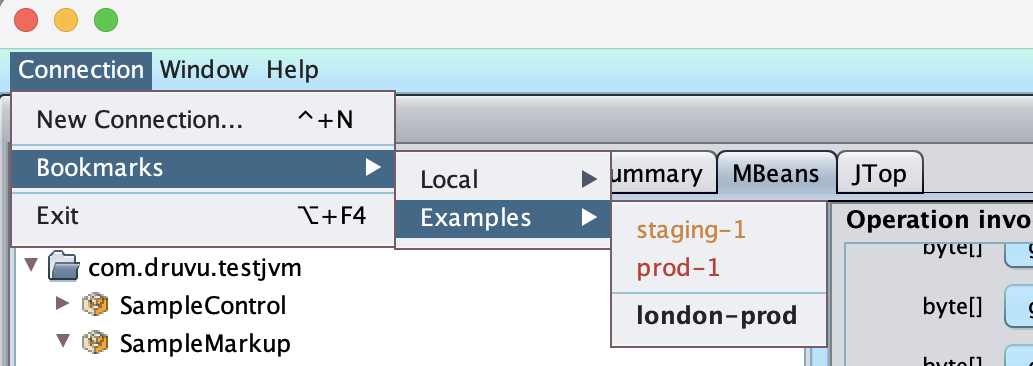
Bookmarked connections with grouping and colour, so staging-1, prod-1, and london-prod are one click away.
Which direction next?
If JMX is part of your day, I’d genuinely like to hear what still fights you — open an issue. Bug reports, questions and ideas are all welcome; Help → Feedback inside the app lands in the same place.
Download
| Platform | Installer | Version | Status |
|---|---|---|---|
| Windows 10 / 11 (x64) | .msix |
1.1.0 | Available |
| macOS (Apple Silicon) | .dmg |
1.1.0 | Available |
| Linux (x86_64) | .AppImage |
1.1.0 | Available |
v1.1.0 adds a headless console mode, a plugin framework, and automatic TLS negotiation with certificate pinning. Installed copies update themselves.
Verify the download:
# macOS — v1.1.0
shasum -a 256 JConsoleBooster.dmg
# 431de7bee78c50fa93a6e50009b771b11825194318e5e030c6c931f7991fdf39

# Windows (PowerShell) — v1.1.0
Get-FileHash JConsoleBooster.msix -Algorithm SHA256
# 1c18560bd1bb3f5fba8cdf97a463edebc85f17d3ef97acdbb598903b89e0c1f7

# Linux — v1.1.0
sha256sum JConsoleBooster.AppImage
# cfec3d6c185d6fc282014e8dc5f9bcc9e7c1a66b7df2ba50e76151e48a49dd36
macOS — signed with an Apple Developer ID and notarized by Apple, so it opens with no Gatekeeper warning. You can verify with spctl -a -t exec -vv JConsoleBooster.app — it reports a Developer ID signature with Team ID F537XPA69T.
Windows — the .msix is Authenticode-signed and timestamped; Windows shows a verified publisher on install. As a new individual publisher, SmartScreen may still show a “Windows protected your PC” prompt on first download until the app builds reputation — click More info → Run anyway to proceed.
Linux — the .AppImage is a single self-contained executable with the Java runtime bundled; there is nothing to install. Make it executable and run it:
chmod +x JConsoleBooster.AppImage
./JConsoleBooster.AppImage
It needs FUSE (libfuse2 on most distributions, or run it with --appimage-extract-and-run). Linux has no OS-level code-signing gate, so nothing is signed — verify integrity with the SHA-256 above.
Intel Macs and other architectures can build from source.
Requirements
- macOS 12 Monterey or later (Apple Silicon), Windows 10 / 11 (x64), or a modern Linux x86_64 desktop (glibc; FUSE for the AppImage). The Java runtime is bundled — no separate JDK needed.
- Target JVMs: any JVM exposing JMX over JMXMP, JDK 8 through the latest release.